How to Apply for Membership
This page walks you through applying to join the Metropolitan Building Managers of New York (Metropolitan BMNY). The application is online, takes about five minutes, and does not collect any payment up front. The membership committee reviews every application before anyone is added to the rolls. Once you are approved, you receive a portal login and pay your annual dues from inside the member website.
What you need
- A few minutes — the form is one page
- The name of a current Metropolitan BMNY member who can give you a referral (Regular applicants only)
- Your employer or building and length of employment (Regular applicants) or your company name and business type (Associate applicants)
- A web browser on your phone, tablet, or computer
The flow at a glance
- Apply — fill out the online application. No payment is collected.
- Review — the membership committee reviews your application. This typically takes 5–10 business days.
- Portal access — if approved, you receive an approval email and, separately, a one-time sign-in link. No password is needed.
- Pay dues — once you log in, the website prompts you to pay your annual dues. Your full member access unlocks as soon as the payment goes through.
That order matters. Metropolitan BMNY does not bill or charge anyone until they have been approved by the committee, so you can apply with confidence — there is no card capture, no pre-authorization hold, no automatic billing.
Choosing the right membership type
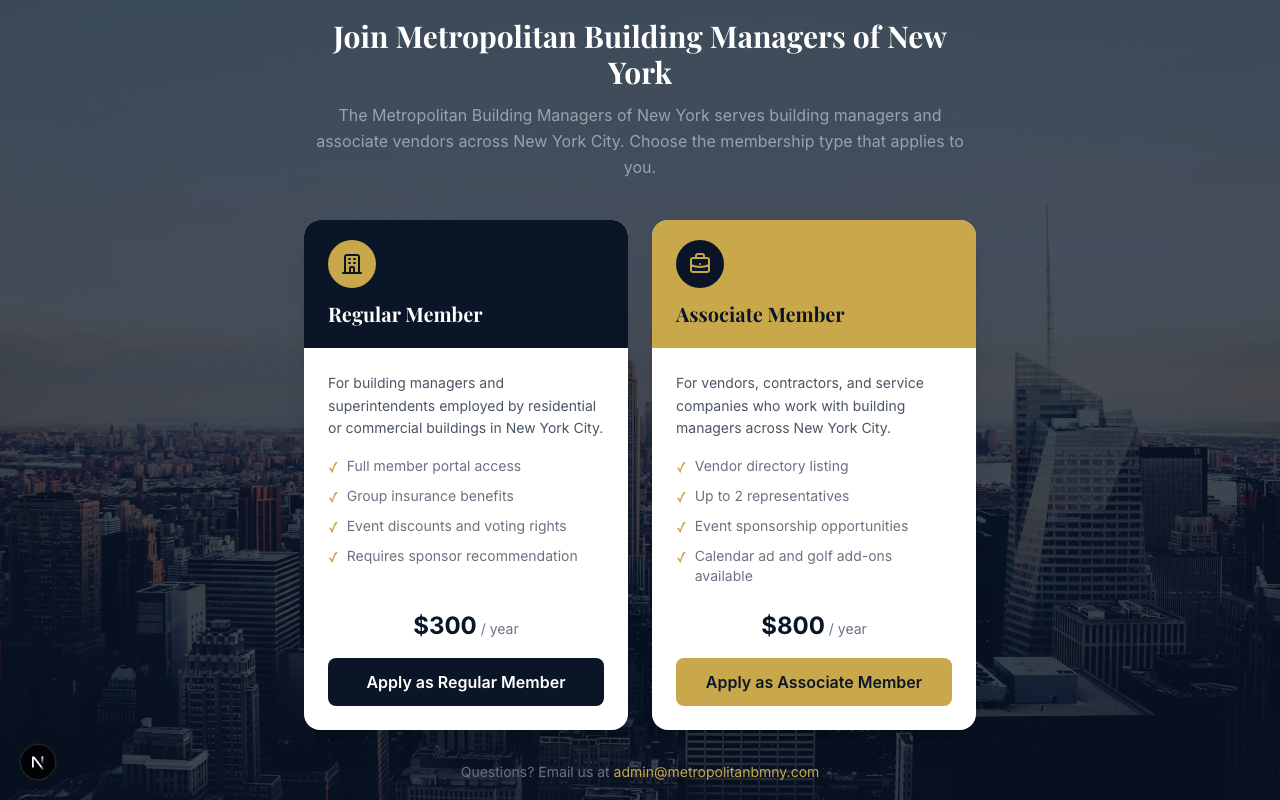
There are two membership types, and the application form is different for each.
Regular Member ($350 per year)
For building managers and superintendents employed by residential or commercial buildings in New York City. Requires a referral from a current Metropolitan BMNY member who can speak to your work.
Associate Member ($1,050 per year)
For vendors, contractors, and service companies who work with building managers across New York City. Includes a vendor directory listing and the option to add a second representative. Two optional add-ons are available — a calendar advertisement (+$150) and a golf tournament sponsorship (+$500) — which you can opt into on the application and which become part of your invoice after approval.
If you are unsure which type applies to you, choose Regular if you personally manage a building. Choose Associate if you represent a company that sells goods or services to building managers.
Steps
-
Open your web browser and go to portal.metropolitanbmny.com/join.
-
Read the two cards on the page. Click Apply as Regular Member or Apply as Associate Member.
-
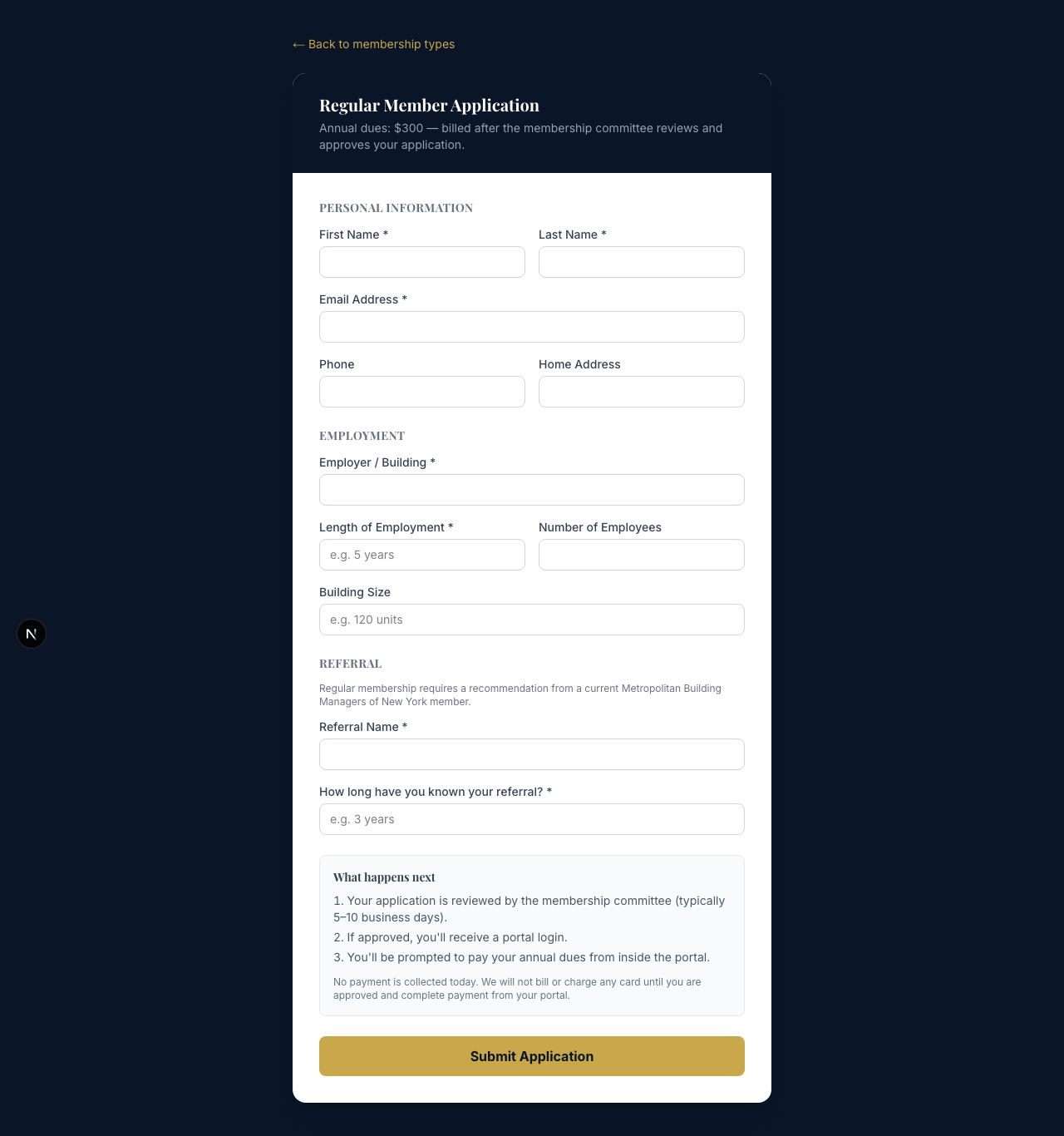
Fill out the application form. Fields marked with a star (*) are required.
-
Review the What happens next section at the bottom of the form. It confirms that no payment is collected today and that you will be billed after approval, from inside the portal.
-
Click Submit Application.
-
You will land on a confirmation page that says Application Received. The membership committee receives your application immediately.


What happens after you apply
You will receive an email confirming that your application has been submitted. The committee reviews applications on a regular cycle and typically responds within 5–10 business days. If the committee needs additional information, someone from the office will reach out.
If your application is approved, you receive two emails: the Welcome to Metropolitan BMNY — Your Application is Approved! email, and a separate Sign in to Metropolitan BMNY email carrying a one-time login link. Click Sign in in the Sign in to Metropolitan BMNY email to log in for the first time — no password needed.
When you log in, the website takes you straight to a page titled Welcome — Activate Your Membership. This is where you pay your annual dues. Click Pay Dues Now to continue to Square's secure checkout. The website uses Square for payments — Metropolitan BMNY never sees or stores your card number.

After your payment is confirmed, your member status changes to active and the rest of the website opens up — events, the vendor directory, and everything else. Your profile and documents are open to you before you pay.
If your application is not approved
Not every application is approved. If the committee declines your application, you will receive an email explaining the decision. Common reasons include applying as a Regular Member without a current member referral, or applying outside the membership eligibility criteria. If you have questions about a decision, email the office at admin@metropolitanbmny.com and we will respond.
If something goes wrong
- Did not get a confirmation email after submitting? Check your spam folder first. Still nothing? Email the office and we will look up your application by name.
- Submitted but want to update something? Email the office and tell us what changed. The committee can update your application before it is reviewed.
- Got the approval email but the sign-in link does not work? The link works once and expires after an hour. Open the sign-in page, type your email and click Email me a login link to get a fresh one. See How to Log In.
- Logged in and cannot find the dues page? If you are newly approved, the website should take you straight to the activation page when you sign in. If it does not, email the office at admin@metropolitanbmny.com and we will check your record, or read How to Pay Annual Dues.
Metropolitan BMNY has been serving NYC building managers since 1944. We review every application personally. Welcome aboard.